File transfer

File transfer reinvented: direct, private and unlimited

Forget about intermediate servers, registrations and size limits. Transfer any file, of any size, directly and securely between your devices.

Privacy by design

Peer-to-peer file transfer

The advantages of iCanSend

Absolute confidentiality

Completely private. Your files are never stored on a third-party server. Thanks to native end-to-end encryption, a direct and secure tunnel is created between sender and recipient. No one, not even us, can intercept or read your data. It is your private communication.

No limits

Truly unlimited. Send whatever you want: a 100 GB archive, a 4K video montage, thousands of photos, an archive of over 1 TB. The only limit is the disk space available on the recipient's device. No more file too large error messages.

Radical simplicity

Instant and free of hassle. No installation, no account creation, no email required, no tracking cookies. Generate a code, share it, and the connection is established. Sharing a file is as easy as having a conversation.

Universally compatible

Breaks down ecosystem barriers. Easily transfer a file from a Mac to a Windows PC, from an Android phone to an iPhone, or from Linux to a tablet. All you need is a modern web browser.

In practice

A direct bridge between your devices, in three simple steps

  1. Create a secure bridge

    Click on Invite a device to generate a unique, temporary code.

    Share this code with your recipient, who enters it to establish a direct, encrypted connection. The link is unique to you and is only valid for a few minutes.

  2. Compose your shipment

    Drag and drop your files, or select them from your device.

    You can add as many files as you want, of any size.

    You keep complete control over the list before starting the transfer.

  3. Start the direct transfer

    Click Start and follow the progress in real time, with the transfer speed and the time remaining.

    Meanwhile you can use the built-in chat to talk privately with your recipient.

Why is it different?

A new category of file transfer

Criterion iCanSend Cloud services AirDrop / Nearby Share
Path of the file Device to device Device to server to device Device to device
Account required No Yes Depends on the ecosystem
Size limit None Storage quota None
Distance Unlimited Unlimited Short range
Retention by a third party None Stored by the provider None
Sustainability No third-party dependency Depends on the provider's infrastructure Depends on a nearby device

With iCanSend you keep full control of your transfers thanks to a direct peer-to-peer connection, with no third-party storage. The path is direct, and sharing a file is like passing an object from hand to hand rather than sending it by post.

Under the hood

Technology that builds your confidence

  • The direct tunnel

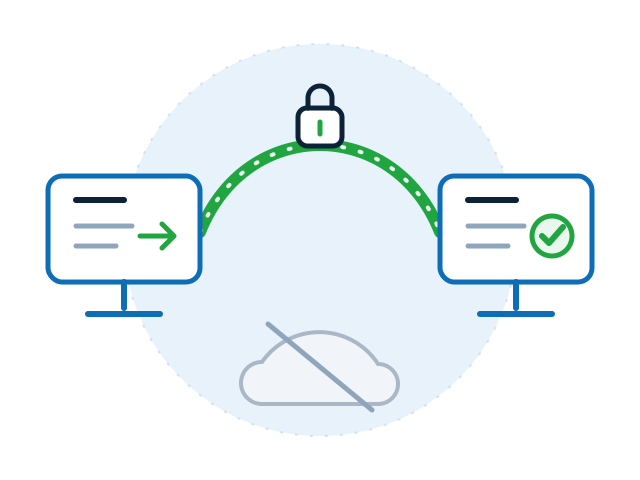
    At the heart of our service is technology that lets two browsers communicate directly, peer to peer, without going through a central server. It is this technology that guarantees the confidentiality and speed of your transfers.

    • The file only travels from sender to recipient
    • This link is what guarantees the confidentiality and speed of the transfer
    Two computers joined by an encrypted arc and a padlock, with no cloud in between
    The direct tunnel: no intermediary server.
  • The intelligent co-pilot

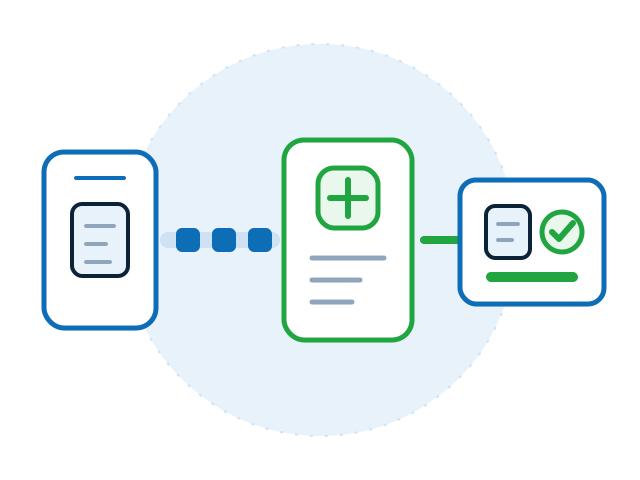
    Receiving a 50 GB file directly in a browser can be complicated. That is where our co-pilot comes in: it works in the background, intercepts the incoming data stream and assembles it intelligently, so you get a standard, robust download. Thanks to it you can download very large files reliably, without overloading your machine's RAM.

    • An ordinary download, even for a multi-gigabyte file
    • Without overloading your computer's memory
    A stream of small blocks coming in from the left, assembled by a component into a single downloadable file
    Assembly: large volumes stay reliable.
  • The discreet operator

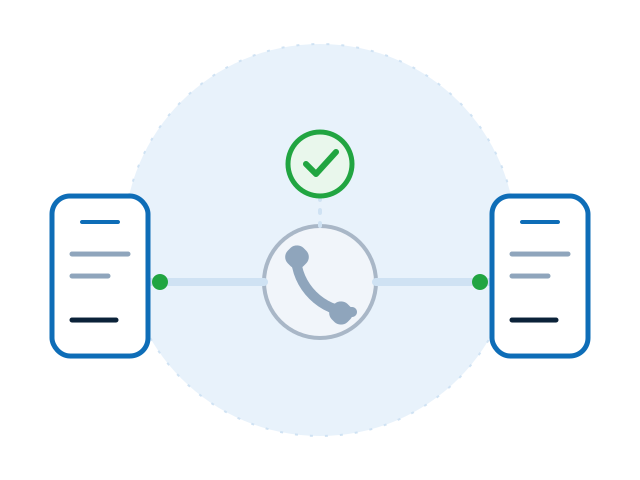
    For two browsers to find each other on the internet, we use a minimalist signalling service. Think of it as a telephone operator: it helps you dial the right number to reach your correspondent. Once the line is established, it hangs up and leaves you to your private conversation. None of your file data ever passes through it.

    • A service reduced to the essentials, working for a few seconds
    • No file data passes through it
    A small telephone operator connects two devices and then hangs up: no file block passes through it
    Signalling: a relay that steps aside.
Use cases

Perfect for

The creatives

Quickly send a design mockup or a large video export to a client for immediate approval.

The developers

Share a code archive or a local database with a colleague without going through a Git repository.

Friends and family

Send all your holiday photos and videos in full quality, without compression or limits.

Security professionals

Transfer a sensitive document or contract directly from one workstation to another, minimising the attack surface.

Every day

Just to send a file from a phone to a laptop, or the other way round, without looking for a cable.

iCanSend Plus

Turn your computer into a secure file server

  • Share your most confidential files with your partners and clients

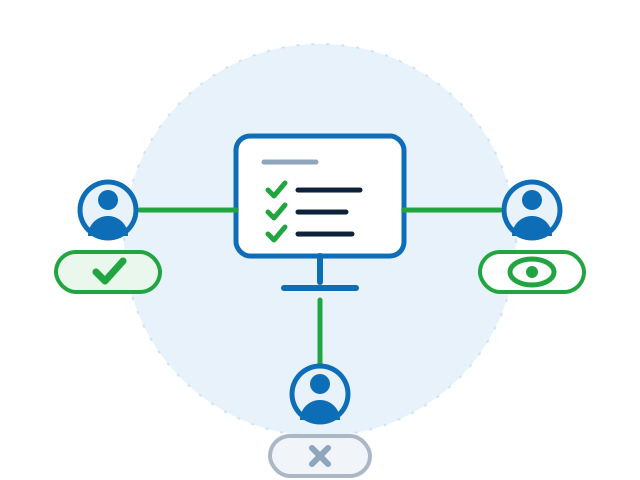
    iCanSend Plus is built for teams that work on confidential files with third parties: consulting, agencies, trading. You open a folder, invite the people concerned and give each the rights that match their role. The files stay on your device, and every access is logged.

    Protect your privacy and your digital sovereignty: the files stay with you, and you decide who gets access.

    • An advanced permissions system gives each user the rights that match their role
    • Monitor activity and control access without hosting your data on a third-party server
    • No installation, no cloud, centralised management without central infrastructure

    Learn more

    A central computer shares a folder with three correspondents, each with different rights, and no cloud involved
    One shared folder, rights matched to each role.
Your questions, our answers

Frequently asked questions

Is it really secure?

Yes. The connection between devices uses DTLS-SRTP encryption, a standardised and proven protocol for securing real-time communications. Your data is encrypted on your device and only decrypted on the recipient's device.

Is there a limit on file size or number of files?

No. You can transfer as many files as you want, and their size is only limited by the storage space available on the device that receives them.

What happens if my internet connection is interrupted during the transfer?

The application is designed to be resilient: it automatically tries to re-establish the direct connection and resume the transfer where it stopped, for a short time. After that you will need to establish a new connection yourself.

Do I need to install anything?

Absolutely not. Everything works in your browser. For faster access you can add the app to your home screen through the install app button, if your browser offers it.

What data is stored on your servers?

None. We do not store your files. The pairing code is temporary and is only used to establish the connection. The chat history is also temporary and only exists during the session, in the RAM of your browser.

Ready to experience the simplest and most private file sharing on the web?

Free, anonymous and instant.